First of all, make sure that the extension (app) is installed on your platform. The solution differs based on your platform.
For Chrome
- Click on the Chrome settings menu icon (the 3 dots)
- Locate the Extention and right-click on the icon
- Select “Keep in Toolbar” from the select menu
For Firefox
First of all not seeing the icon could mean one of 2 things:
- Make sure the extention is still installed. You (my mistake) or some other extention (yes extentions can uninstall other extensions) might have uninstalled it. Make sure to install it again if this is the case. In order to find this out please open Firefox, local Add-Ons menu and make sure to see Hoxx VPN Extension there.
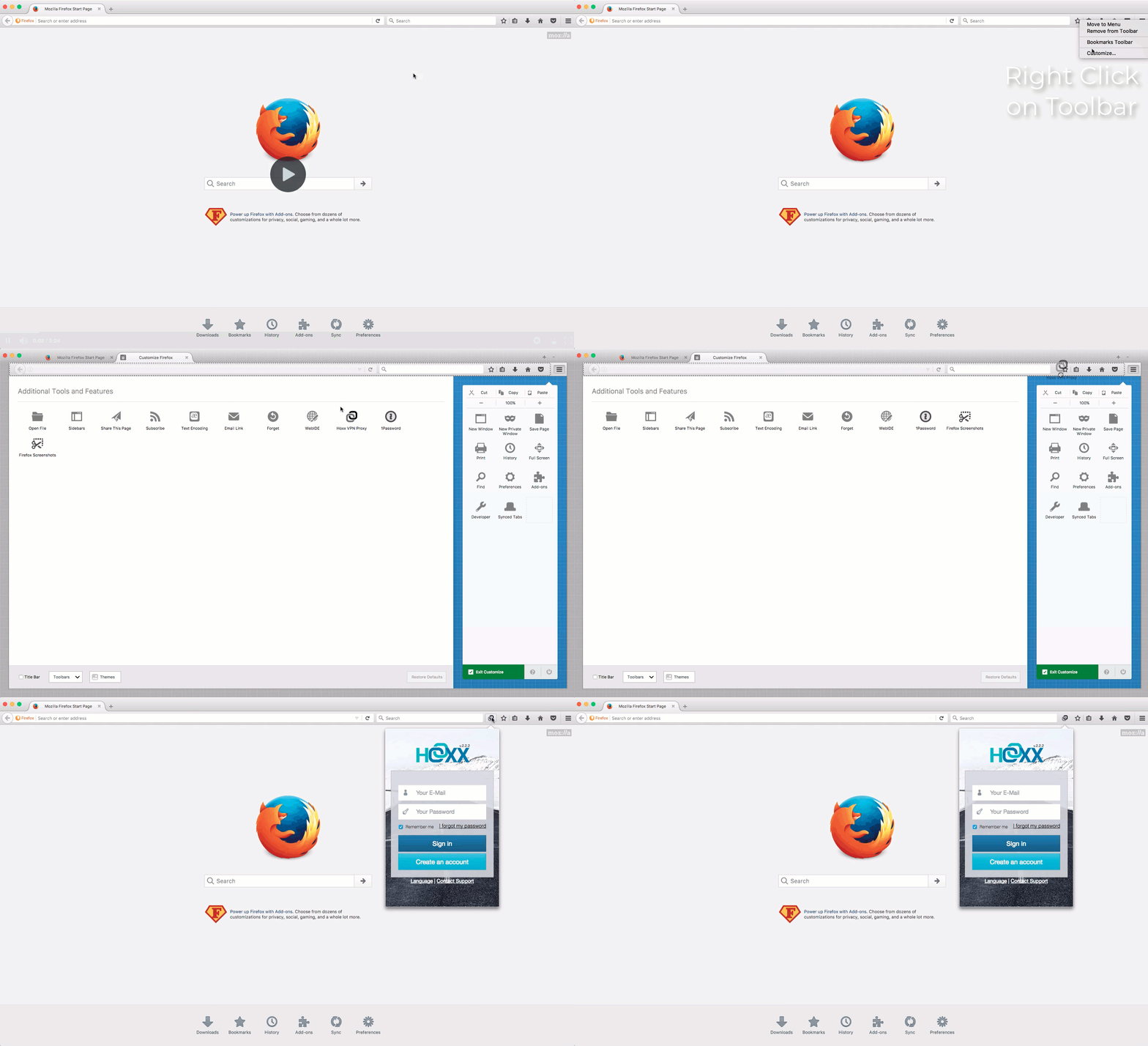
- sometimes you or some other addon might HIDE it from the toolbar. In such a case you will need to customize your toolbar and bring it back to toolbar. Right click on the toolbar and click to Customize.
Comments
0 comments
Please sign in to leave a comment.